



Lub cuab yeej nrhiav qhov tseem ceeb ntawm Tuya txuas nrog lub xov tooj lub Tuya app uas twb muaj lawm thiab yog ib qho ntawm cov cuab yeej taug qab zoo tshaj plaws tam sim no. Nws muaj tus qauv me me, yog li nws tuaj yeem haum rau txhua qhov chaw.
Hauv koj lub hnab nqa khoom, peb xav kom koj muab tso rau hauv koj lub hnab (tsis txhob siv tus yuam sij los dai) kom nws thiaj li tsis puas.
Txuas koj lub cuab yeej nrhiav tus yuam sij rau koj lub Xov Tooj los ntawm kev coj lub cuab yeej nrhiav tus yuam sij ze rau koj lub xov tooj. Tom qab ntawd nws yuav coj koj mus rau qhov kev teeb tsa siv Tuya app. Lub cuab yeej nrhiav tus yuam sij yuav txuas rau koj lub xov tooj los ntawm Bluetooth thiab tom qab ntawd nws yuav hais kom koj muab lub npe rau lub cuab yeej nrhiav tus yuam sij. Tom qab ntawd koj yuav raug hais kom sau npe lub cuab yeej nrhiav tus yuam sij rau koj tus ID thiab koj txhua yam tau teeb tsa tiav.
Thaum txuas nrog lawm, koj yuav pom qhov chaw ntawm koj lub cuab yeej nrhiav tus yuam sij ntawm koj lub Tuya app.
Lub roj teeb tsis yog ib qho teeb meem, vim tias lub cuab yeej nrhiav tus yuam sij yuav siv tau ntev tshaj ib xyoos ntawm ib lub roj teeb npib.
Qhov ntau ntawm lub cuab yeej nrhiav tus yuam sij, thaum teev tias yog 50m, yog qhov dav dua - yog tias nws mus ncig ze rau lwm lub xov tooj. Qhov no yog li cas nws yuav ua haujlwm los pab koj taug qab koj lub hnab. Tsuav yog lub cuab yeej nrhiav tus yuam sij nyob hauv (Bluetooth) ntau ntawm Tuya network lossis leej twg lub xov tooj, nws tuaj yeem sib txuas lus nrog nws.
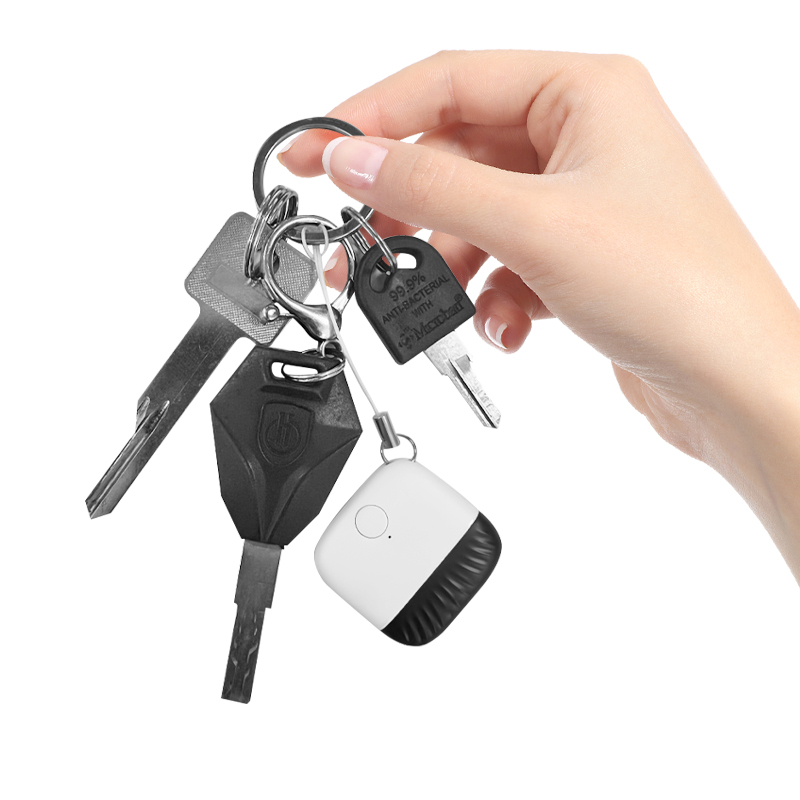
Lub cuab yeej nrhiav qhov tseem ceeb ntawm Tuya txuas nrog lub xov tooj lub Tuya app uas twb muaj lawm thiab yog ib qho ntawm cov cuab yeej taug qab zoo tshaj plaws tam sim no. Nws muaj tus qauv me me, yog li nws tuaj yeem haum rau txhua qhov chaw.
Hauv koj lub hnab nqa khoom, peb xav kom koj muab tso rau hauv koj lub hnab (tsis txhob siv tus yuam sij los dai) kom nws thiaj li tsis puas.
Txuas koj lub cuab yeej nrhiav tus yuam sij rau koj lub Xov Tooj los ntawm kev coj lub cuab yeej nrhiav tus yuam sij ze rau koj lub xov tooj. Tom qab ntawd nws yuav coj koj mus rau qhov kev teeb tsa siv Tuya app. Lub cuab yeej nrhiav tus yuam sij yuav txuas rau koj lub xov tooj los ntawm Bluetooth thiab tom qab ntawd nws yuav hais kom koj muab lub npe rau lub cuab yeej nrhiav tus yuam sij. Tom qab ntawd koj yuav raug hais kom sau npe lub cuab yeej nrhiav tus yuam sij rau koj tus ID thiab koj txhua yam tau teeb tsa tiav.
Thaum txuas nrog lawm, koj yuav pom qhov chaw ntawm koj lub cuab yeej nrhiav tus yuam sij ntawm koj lub Tuya app.
Lub roj teeb tsis yog ib qho teeb meem, vim tias lub cuab yeej nrhiav tus yuam sij yuav siv tau ntev tshaj ib xyoos ntawm ib lub roj teeb npib.
Qhov ntau ntawm lub cuab yeej nrhiav tus yuam sij, thaum teev tias yog 50m, yog qhov dav dua - yog tias nws mus ncig ze rau lwm lub xov tooj. Qhov no yog li cas nws yuav ua haujlwm los pab koj taug qab koj lub hnab. Tsuav yog lub cuab yeej nrhiav tus yuam sij nyob hauv (Bluetooth) ntau ntawm Tuya network lossis leej twg lub xov tooj, nws tuaj yeem sib txuas lus nrog nws.
Lub sijhawm tshaj tawm: Lub Ib Hlis-29-2023